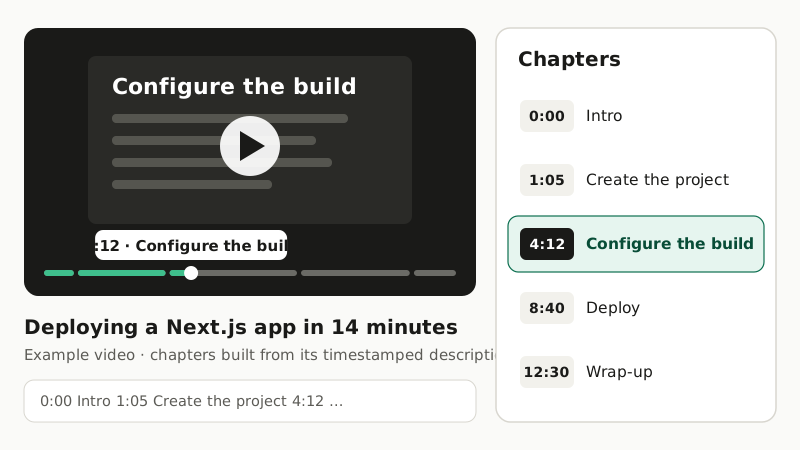
Chapters turn a long video into a table of contents. Viewers jump to the part they need instead of scrubbing, the progress bar shows where each topic starts, and Google Search can show those moments as key moments in results. The catch is that someone has to write them: rewatch the video, note when each topic starts, keep the timestamps right.
This use case automates that. You send a video to the Video API. It returns a timestamped description of what happens on screen, the transcript and a summary, and a short script turns them into chapters ready for a YouTube description. The same chapters work as a WebVTT track for your own player.
Who this is for
- Creators and channel managers who publish tutorials, talks or reviews and want chapters on every upload without rewatching them.
- Agencies that publish video for several clients and want chapters to be part of the upload checklist.
- Course and documentation teams that host video on their own player and want a chapter menu inside every lesson.
YouTube's rules for chapters
YouTube reads chapters from timestamps in the video description, one per line:
0:00 Intro
1:05 Create the project
4:12 Configure the build
8:40 Deploy
12:30 Wrap-up
For them to appear:
- the first timestamp must be 0:00,
- there must be at least three timestamps, in ascending order,
- every chapter must be at least 10 seconds long.
Videos of an hour or more use 1:02:03-style timestamps. The script below handles all of this for you.
How it works
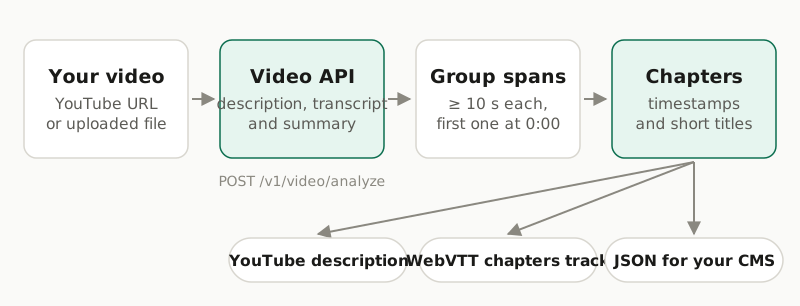
The Video API watches the video and returns four possible outputs. Three of them matter here:
| Output | Why it matters for chapters |
|---|---|
description |
What is on screen, as timestamped spans. Spans break at visual changes (a new slide, a cut, a different screen) and usually last 5 to 20 seconds. Short on-screen text such as slide titles is quoted word for word. |
transcript |
What is said, with timestamps. Useful when the visuals barely change, such as a talking head. |
summary |
One paragraph about the whole video, a good first paragraph for the video description. |
Chapters are topics, not shots, so the spans need grouping. The simplest signal is on-screen text: a new slide title or section card usually starts a new topic.
Step 1: Analyze the video
To see what the API returns before writing any code, paste a link into the free video summarizer demo. It needs no account.
Send a public YouTube link, or a file through uploads, and ask for the three outputs. The price is the same whatever outputs you request.
curl -X POST https://api.opencorpo.com/v1/video/analyze \
  -H "X-API-Key: $OPENCORPO_API_KEY" \
  -H "Content-Type: application/json" \
  -d '{
    "source": {"type": "youtube", "url": "https://www.youtube.com/watch?v=YOUR_VIDEO_ID"},
    "outputs": ["summary", "description", "transcript"],
    "options": {"detail": "high"}
  }'
"detail": "high" reads small on-screen text more reliably, which helps with slides and screen recordings. It costs 2× the default price, so leave it out for camera footage. The call returns a job; wait for it with GET /v1/video/jobs/{id}?wait=60, as shown in the transcript guide.
Here is part of a completed job for a 14-minute tutorial. The video is fictional and the output is abridged:
{
  "status": "completed",
  "duration_seconds": 840,
  "results": {
    "summary": "A developer creates a Next.js project, configures the build and deploys it to a hosting platform ...",
    "description": [
      { "start": "00:00", "end": "00:12", "start_seconds": 0.0, "end_seconds": 12.0,
        "text": "A presenter at a desk; a title card reads \"Deploying a Next.js app\"." },
      { "start": "01:05", "end": "01:20", "start_seconds": 65.0, "end_seconds": 80.0,
        "text": "Screen share: a terminal runs \"npx create-next-app\" in an empty folder." },
      { "start": "04:12", "end": "04:30", "start_seconds": 252.0, "end_seconds": 270.0,
        "text": "Slide titled \"Configure the build\" lists output and image settings." }
    ],
    "transcript": [ ... ]
  }
}
Step 2: Draft chapters from the description
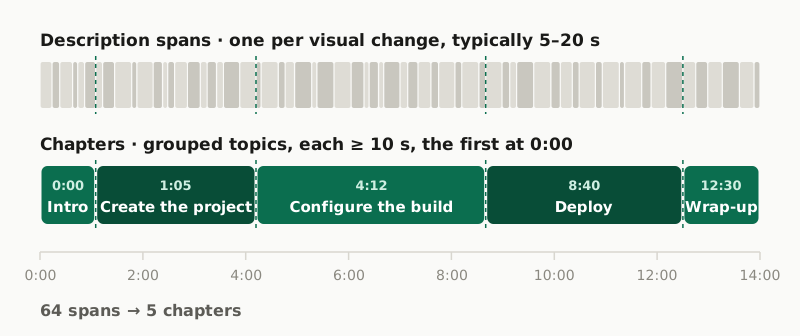
This function walks through the spans. It starts a new chapter when on-screen text is quoted and the current chapter is at least min_len seconds long. It also starts one when a chapter reaches max_len seconds, so long stretches still get split.
import re

QUOTED = re.compile(r'"([^"]{3,60})"')


def draft_chapters(spans, min_len=45, max_len=240):
    """Group description spans into chapter drafts."""
    chapters = []
    for span in spans:
        start = int(span["start_seconds"])
        quoted = QUOTED.search(span["text"])
        length = start - chapters[-1]["start"] if chapters else None
        if not chapters or (quoted and length >= min_len) or length >= max_len:
            title = quoted.group(1) if quoted else " ".join(span["text"].split()[:6]) + "…"
            chapters.append({"start": start, "title": title})
    if chapters:
        chapters[0]["start"] = 0
    return chapters


job = ...  # the completed job from step 1
chapters = draft_chapters(job["results"]["description"])
min_len stops a fast run of slides from turning into ten tiny chapters. Raise it for long talks and lower it for short tutorials.
Step 3: Make them YouTube-valid
def fmt(seconds, hours=False):
    h, rest = divmod(int(seconds), 3600)
    m, s = divmod(rest, 60)
    return f"{h}:{m:02d}:{s:02d}" if hours else f"{m}:{s:02d}"


def youtube_chapters(chapters, duration):
    """First at 0:00, ascending, each at least 10 s, at least three."""
    kept = []
    for c in sorted(chapters, key=lambda c: c["start"]):
        if kept and c["start"] - kept[-1]["start"] < 10:
            continue
        kept.append(dict(c))
    if not kept:
        raise ValueError("no chapters")
    kept[0]["start"] = 0
    if len(kept) > 1 and duration - kept[-1]["start"] < 10:
        kept.pop()
    if len(kept) < 3:
        raise ValueError("YouTube needs at least three chapters")
    hours = duration >= 3600
    return "\n".join(f"{fmt(c['start'], hours)} {c['title']}" for c in kept)


print(youtube_chapters(chapters, job["duration_seconds"]))
For the example video, that prints:
0:00 Deploying a Next.js app
1:05 npx create-next-app
4:12 Configure the build
8:40 Deploy
12:30 Thanks for watching
The timestamps are right, and some titles are better than others. "Configure the build" came from a slide and is perfect. "npx create-next-app" is the command on screen, not the topic. "Thanks for watching" is an end card. Two ways to finish the job:
- Edit the titles by hand. With the timestamps already right, this takes under a minute.
- Let a language model name them. Send it the drafts with the matching transcript lines and ask for short titles:
You write YouTube chapter titles. Below are chapter start times with the
on-screen description and transcript for each chapter. Return JSON:
[{"start": <seconds>, "title": "<2 to 5 words>"}]. Keep every start time
unchanged. Titles describe the topic, not the on-screen text.

<chapters with their description and transcript excerpts>
Either way, run the final list through youtube_chapters() again, so a renamed or reordered list still meets the rules.
Step 4: Publish the description
Put the summary on top and the chapters below it:
description = (
    job["results"]["summary"]
    + "\n\nChapters\n"
    + youtube_chapters(chapters, job["duration_seconds"])
)
print(description)
Paste it into the video description in YouTube Studio. To update descriptions automatically, the YouTube Data API's videos.update method can set them, with OAuth authorization from the channel.
Chapters for your own player
If you host video yourself, the same list becomes a WebVTT chapters file:
def webvtt_chapters(chapters, duration):
    def ts(sec):
        h, rest = divmod(int(sec), 3600)
        m, s = divmod(rest, 60)
        return f"{h:02d}:{m:02d}:{s:02d}.000"

    out = ["WEBVTT", ""]
    for i, c in enumerate(chapters):
        end = chapters[i + 1]["start"] if i + 1 < len(chapters) else duration
        out += [str(i + 1), f"{ts(c['start'])} --> {ts(end)}", c["title"], ""]
return "\n".join(out)<video controls src="/media/deploy-nextjs.mp4">
<track kind="chapters" src="/media/deploy-nextjs.chapters.vtt" srclang="en" default>
</video>Browsers' built-in controls mostly ignore chapter tracks, but players such as Video.js turn them into a chapter menu. You can also read the cues in JavaScript and build your own list.
Videos longer than 20 minutes
The API analyses up to 20 minutes per video, which is enough for most tutorials. For a longer recording you own, split it without re-encoding into parts of about 19 minutes, so a part that runs a few seconds over the cut point is not truncated:
ffmpeg -i webinar.mp4 -c copy -f segment -segment_time 1140 -reset_timestamps 1 part_%02d.mp4Analyse each part through uploads. Then shift each part's spans by the total length of the parts before it, and draft chapters once over the combined list:
offset, all_spans = 0, []
for job in part_jobs:  # completed jobs, in order
    for span in job["results"]["description"]:
        all_spans.append({**span,
                          "start_seconds": span["start_seconds"] + offset,
                          "end_seconds": span["end_seconds"] + offset})
    offset += job["duration_seconds"]

chapters = draft_chapters(all_spans, min_len=120, max_len=600)
print(youtube_chapters(chapters, offset))
For a YouTube link, only the first 20 minutes are analysed and the job is marked truncated.
What it costs
Analysis is billed per started minute of video, once per video: €0.05 / minute on the default model. The 14-minute example is billed as 14 minutes, and asking for three outputs instead of one costs nothing extra. "detail": "high" multiplies the price by 2. Grouping, formatting and publishing run in your own code at no cost. Your first 3 analyses are free, but each free try covers only the first 5 minutes of a video, so use a short video to try the workflow. Live prices are on the pricing page.
Limits
- Titles are drafts. Boundaries are usually right; titles taken from on-screen text sometimes name a command or an end card instead of the topic. Review before publishing.
- Visual signals need visual changes. In a single-camera talk with no slides, the description changes little. Use the transcript to choose topics, or let a language model do it from the transcript.
- 20 minutes per video, public YouTube videos or your own uploads. Private videos fail with
youtube_private, and a failed job is not charged. - Timestamps are to the second. That is the precision chapters need.
Frequently asked questions
What are YouTube's rules for chapters?
Timestamps go in the video description, one per line. The first must be 0:00, there must be at least three in ascending order, and each chapter must be at least 10 seconds long. Chapters can take a little while to appear after you save.
Doesn't YouTube create chapters automatically?
It can, for some videos, if automatic chapters are allowed in the video's settings. Writing your own gives you control over the titles and lets you reuse the same chapters in your own player, a course platform or a CMS.
Does it work for videos without speech?
Yes. The chapters come from the description of what is on screen, which does not depend on speech. For a talking-head video with little visual change, use the transcript to choose topics instead.
How long can the video be?
Up to 20 minutes are analysed per video. For a longer recording you own, split it into parts of about 19 minutes, analyse each and offset the timestamps, as shown in this article.
How much does it cost?
Video analysis is billed per started minute, once per video, whatever outputs you request: €0.05 / minute on the default model. Your first 3 analyses are free and cover up to the first 5 minutes of a video.