Most teams have more video than anyone can watch: product webinars, onboarding sessions, all-hands, sales demos, conference talks. The knowledge in them is real, but it is locked in time. Finding the moment someone showed the new pricing table, or explained how refunds work, means opening recordings one by one and scrubbing.
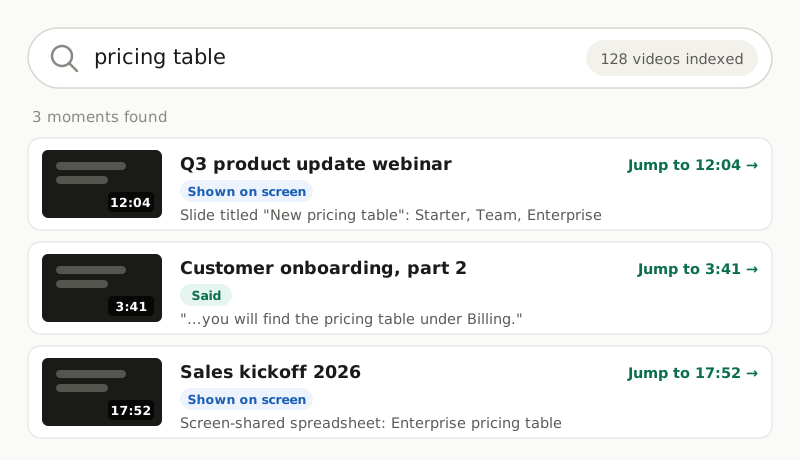
Video platforms usually search titles, descriptions and tags, not what happens inside the video. This use case fixes that with the Video API. Every video is analysed once into timestamped segments of what is said and what is shown. Those go into a search index, and every search result links to the exact second.
Who this is for
- Customer education and support teams with libraries of training and how-to videos.
- Product and marketing teams with an archive of webinars and launch demos.
- Internal tools and knowledge-base builders who want recordings to show up next to documents in search, or in a chat assistant's answers.
Why the transcript alone is not enough
Transcript search is the usual first step, and it finds what people said. In a webinar or a training, though, much of the substance is on screen: the slide, the settings page, the code, the chart. Presenters point at it ("as you can see here...") without reading it out.
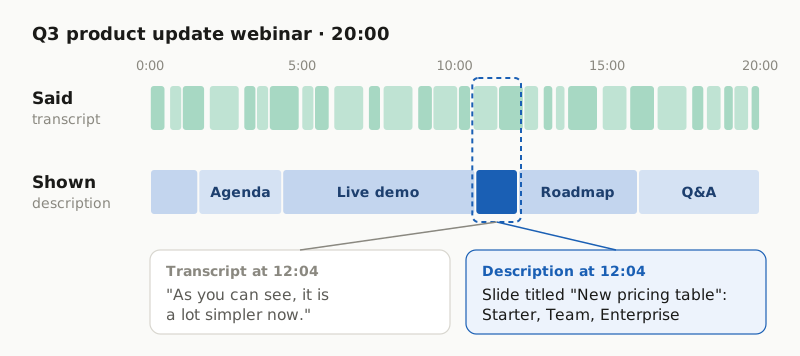
The Video API returns both lanes. The transcript holds the speech. The description covers what is visible, span by span, and quotes short on-screen text such as slide titles, buttons and captions word for word. Index both and the pricing slide above becomes findable.
The architecture
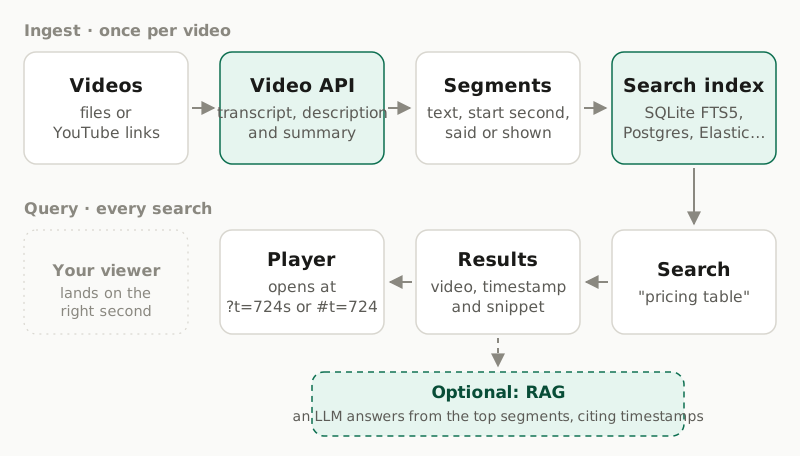
Two separate paths:
- Ingest, once per video. Analyse the video, then store its segments: text, start second, video id, and whether the text was said or shown.
- Query, on every search. Search the index and return the video, timestamp and snippet, with a link that opens the player at that second. No API call is involved, so searching is fast and costs nothing.
This guide uses SQLite's built-in FTS5 full-text search because it needs no server and runs anywhere Python does. The same segments work in Postgres full-text search, Elasticsearch, OpenSearch, Meilisearch or a vector database.
Step 1: Analyze every video
To see the transcript and on-screen description for one of your own videos first, try the free video summarizer demo. It needs no account.
The helpers below upload a file (or take a YouTube link), start an analysis and wait for it. An account runs at most three video jobs at a time, so the batch uses three workers.
import mimetypes
import os
from concurrent.futures import ThreadPoolExecutor

import requests

API = "https://api.opencorpo.com"
HEADERS = {"X-API-Key": os.environ["OPENCORPO_API_KEY"]}


def check(r):
    if not r.ok:
        err = r.json()["error"]
        raise RuntimeError(f"{err['code']}: {err['message']}")
    return r.json()


def upload(path):
    """Send a local file to storage; returns an upload_id (files are kept 7 days)."""
    ctype = mimetypes.guess_type(path)[0] or "video/mp4"
    up = check(requests.post(f"{API}/v1/uploads", headers=HEADERS, timeout=30, json={
        "filename": os.path.basename(path), "content_type": ctype,
        "size_bytes": os.path.getsize(path)}))
    with open(path, "rb") as fh:
        requests.put(up["url"], data=fh, headers=up["headers"], timeout=900).raise_for_status()
    return up["upload_id"]


def analyze(source):
    job = check(requests.post(f"{API}/v1/video/analyze", headers=HEADERS, timeout=30, json={
        "source": source, "outputs": ["summary", "transcript", "description"]}))
    while job["status"] in ("queued", "processing"):
        job = check(requests.get(f"{API}/v1/video/jobs/{job['id']}", headers=HEADERS,
                                 params={"wait": 60}, timeout=100))
    if job["status"] != "completed":
        raise RuntimeError(f"{job['id']} {job['status']}: {job.get('error')}")
    return job


library = [
    {"id": "q3-update", "title": "Q3 product update webinar",
     "url": "https://videos.example.com/q3-update.mp4", "file": "recordings/q3-update.mp4"},
    {"id": "onboarding-2", "title": "Customer onboarding, part 2",
     "url": "https://www.youtube.com/watch?v=YOUR_VIDEO_ID"},
]


def process(video):
    if "file" in video:
        source = {"type": "upload", "upload_id": upload(video["file"])}
    else:
        source = {"type": "youtube", "url": video["url"]}
    return video, analyze(source)


with ThreadPoolExecutor(max_workers=3) as pool:
    analysed = list(pool.map(process, library))
For slide-heavy recordings, add "options": {"detail": "high"} to the analyze request. It reads small on-screen text more reliably and costs 2× the default price.
Step 2: Index what is said and shown
One table holds the videos, and an FTS5 table holds every segment. The porter tokenizer adds stemming, so "price tables" also finds "pricing table".
import sqlite3

db = sqlite3.connect("videos.db")
db.executescript("""
CREATE TABLE IF NOT EXISTS videos (id TEXT PRIMARY KEY, title TEXT, url TEXT, summary TEXT);
CREATE VIRTUAL TABLE IF NOT EXISTS segments USING fts5(
    text, kind UNINDEXED, video_id UNINDEXED, start UNINDEXED,
    tokenize = 'porter unicode61'
);
""")


def index_job(db, video_id, title, url, job):
    """Store one completed analysis: the summary and every segment."""
    results = job["results"]
    db.execute("INSERT OR REPLACE INTO videos VALUES (?, ?, ?, ?)",
               (video_id, title, url, results.get("summary")))
    db.execute("DELETE FROM segments WHERE video_id = ?", (video_id,))
    rows = [(s["text"], "said", video_id, s["start_seconds"]) for s in results.get("transcript", [])]
    rows += [(s["text"], "shown", video_id, s["start_seconds"]) for s in results.get("description", [])]
    db.executemany("INSERT INTO segments (text, kind, video_id, start) VALUES (?, ?, ?, ?)", rows)
    db.commit()


for video, job in analysed:
    index_job(db, video["id"], video["title"], video["url"], job)
Re-indexing a video replaces its segments, so you can run this again whenever a video is re-analysed.
Step 3: Search and jump to the second
def fmt(seconds):
    m, s = divmod(int(seconds), 60)
    return f"{m}:{s:02d}"


def deep_link(url, seconds):
    t = int(seconds)
    if "youtube.com/" in url or "youtu.be/" in url:
        return f"{url}{'&' if '?' in url else '?'}t={t}s"
    return f"{url}#t={t}"  # media fragment: most browsers start playback there


def search(db, query, limit=10, any_word=False):
    # Quote every word so user input can never break FTS5 query syntax.
    # By default every word must match; any_word=True ranks segments matching any of them.
    words = ['"' + w.replace('"', '""') + '"' for w in query.split()]
    match = (" OR " if any_word else " ").join(words)
    rows = db.execute(
        """SELECT v.title, v.url, s.kind, s.start, snippet(segments, 0, '[', ']', '…', 12)
           FROM segments AS s JOIN videos AS v ON v.id = s.video_id
           WHERE segments MATCH ? ORDER BY rank LIMIT ?""",
        (match, limit),
    )
    return [{"video": title, "kind": kind, "at": fmt(start), "snippet": snip,
             "link": deep_link(url, start)}
            for title, url, kind, start, snip in rows]


for hit in search(db, "pricing table"):
    print(hit)
With the two example videos indexed, that returns:
{'video': 'Customer onboarding, part 2', 'kind': 'said', 'at': '3:41',
 'snippet': 'You will find the [pricing] [table] under Billing, next to your invoices.',
 'link': 'https://www.youtube.com/watch?v=YOUR_VIDEO_ID&t=221s'}
{'video': 'Q3 product update webinar', 'kind': 'shown', 'at': '12:04',
 'snippet': 'Slide titled "New [pricing] [table]": three columns Starter, Team and Enterprise, Team…',
 'link': 'https://videos.example.com/q3-update.mp4#t=724'}
The kind field lets your interface label each result "Said" or "Shown on screen". People trust a result more when they can see why it matched. The summary stored with each video makes a good one-line description on the result card.
Step 4 (optional): Answer questions with citations
Search returns moments; a chat assistant returns answers. The segments make a good retrieval layer for retrieval-augmented generation (RAG): fetch the top matches, give them to the language model you already use, and require it to cite the video and timestamp.
def build_context(db, question, limit=8):
    hits = search(db, question, limit, any_word=True)  # questions rarely share every word
    lines = [f"[{h['video']} @ {h['at']}] ({h['kind']}) {h['snippet']}" for h in hits]
    prompt = (
        "Answer the question using only the video excerpts below. After each fact, "
        "cite its source as [video @ m:ss]. If the excerpts do not answer it, say so.\n\n"
        + "\n".join(lines)
        + f"\n\nQuestion: {question}"
    )
    return prompt, hits  # send `prompt` to your LLM; turn citations into links with `hits`
For questions phrased differently from the video's wording, retrieve with embeddings instead of keywords. Embed each segment once, store the vector next to its timestamp, and search by similarity. The rest of the pipeline stays the same.
Keeping the library current
- New recordings: analyse and index them as they are published, for example from the webhook or job that uploads them.
- Removed recordings: delete their rows from your index.
DELETE /v1/video/jobs/{id}also deletes the job, its results and its stored source file on OpenCorpo's side. - Re-analysis (for example with
detail: high):index_jobreplaces the old segments.
What it costs
Each video is analysed once, billed per started minute: €0.05 / minute on the default model, whatever outputs you request. A 100-hour archive is 6,000 minutes of analysis, paid once; after that every search runs against your own index for free. Your first 3 analyses are free, each covering up to the first 5 minutes, enough to test the pipeline on a few short recordings. Live prices are on the pricing page.
Limits and good practice
- 20 minutes per video. Split longer files you own into parts of about 19 minutes and add each part's offset to its timestamps before indexing. Our chapters guide shows how.
- Three jobs at a time per account; the batch code respects that.
- No translation. Transcripts are in the spoken language. To search across languages, translate the segments or use multilingual embeddings.
- Keyword search finds words, not meaning. FTS5 handles stemming, not synonyms. Add embeddings if your users search in their own words.
- Speakers are labelled, not identified. Speaker labels use names only when the video states them; otherwise "Speaker 1", "Speaker 2".
- Decide what you may process. Internal meetings and customer calls can contain personal data. Agree which recordings go into the library and who can search it before you index them. YouTube sources must be public videos.
Frequently asked questions
Can I search inside videos without transcribing them myself?
Yes. The Video API returns a timestamped transcript and a timestamped description of what is on screen. You store those segments in any search index and query them like text.
Why index the on-screen description and not just the transcript?
Much of what people look for in webinars and trainings is shown rather than said: slides, settings screens, code, charts. The description records it, quoting short on-screen text word for word, so those moments become searchable too.
Does this do semantic search?
The SQLite FTS5 example is keyword search with stemming, so 'price tables' finds 'pricing table'. For search by meaning, embed the same segments and store the vectors in a vector index; the segments and timestamps stay the same.
What about recordings longer than 20 minutes?
Up to 20 minutes are analysed per video. Split longer files you own into parts of about 19 minutes and add each part's offset to its timestamps before indexing.
How much does indexing a library cost?
Analysis is billed once per video, per started minute: €0.05 / minute on the default model. Searching your own index costs nothing. Your first 3 analyses are free.